Statistical Tutorial ·
Mediation Analysis Without PROCESS: A Bootstrap Walkthrough
Run a mediation analysis without installing Hayes' PROCESS macro: describe the model in one line and get bootstrap indirect effects, confidence intervals, and path coefficients back in one pass. Demo data, N = 300.
You can run a mediation analysis without installing Hayes' PROCESS macro for SPSS: upload your data, describe the model in one sentence, and get bootstrap-based indirect effects, confidence intervals, and path coefficients back in one pass. Below is a full walkthrough using simulated survey data (N = 300), run inside ChatSRS.
What This Walkthrough Covers
Your thesis needs a mediation analysis, and the first thought is: better go install Hayes' PROCESS macro for SPSS, then figure out which model number applies, then set the bootstrap resample count. Just finding the right tutorial and installing the add-in is enough of a chore on its own — and that's before you're rerunning the whole thing because you swapped out the independent variable.
This one uses a simulated dataset (demo data, N = 300, mean scores on three constructs — perceived usefulness (PU), attitude (ATT), and behavioral intention (BI) — not real user data), walking through how mediation analysis actually works in ChatSRS.
Before testing whether one construct explains the relationship between two others, many workflows first confirm each construct is internally consistent; see how to run, interpret, and report Cronbach's alpha.
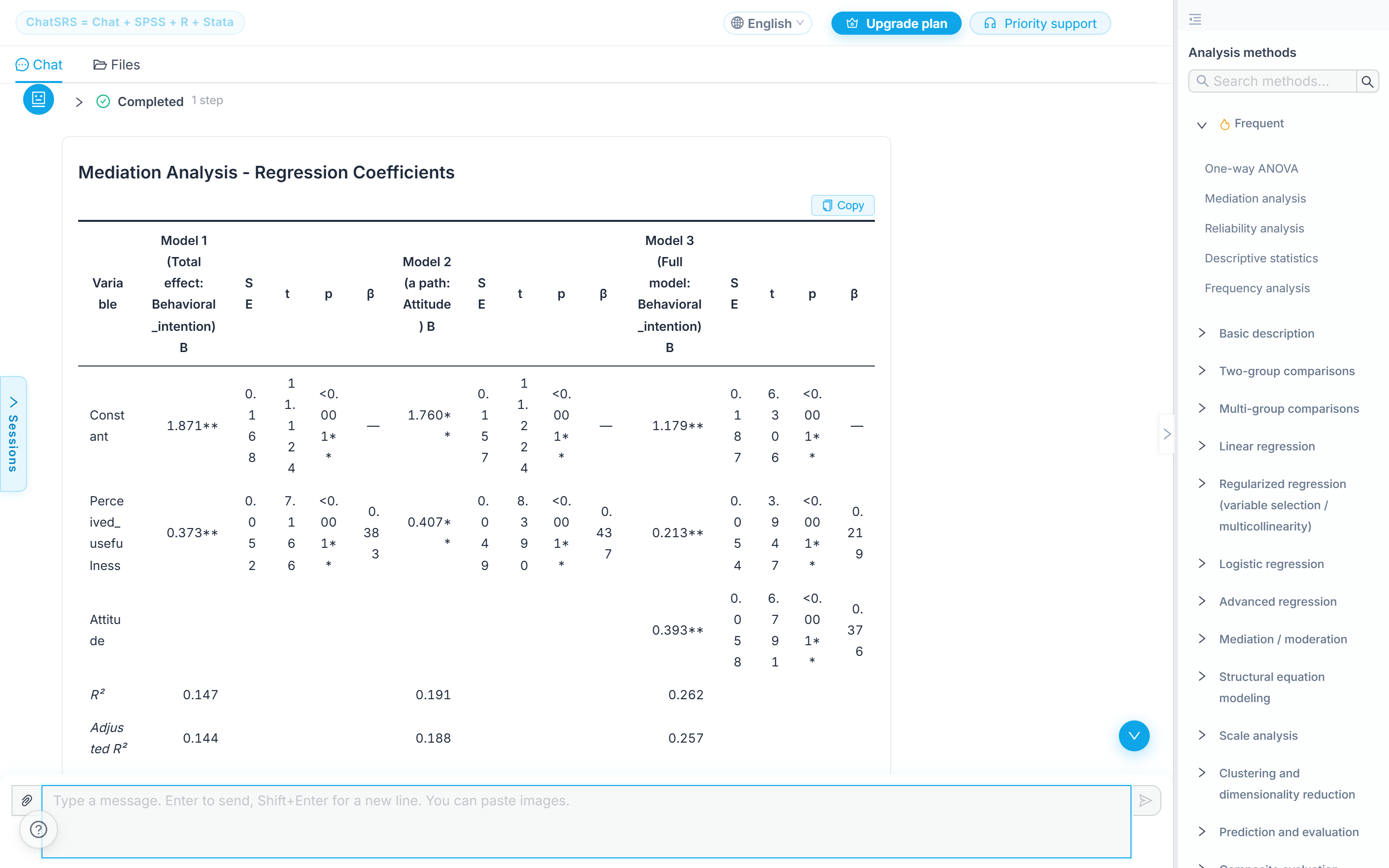 ChatSRS's method list — mediation and moderation already sits alongside reliability, ANOVA, and regression, no separate install required.
How to Run It: One Prompt, No PROCESS Macro
The whole thing is a conversation: upload the data, type one line — "Test whether PU affects BI through ATT" — and it automatically identifies the predictor (X), the mediator (M), and the outcome (Y). No installing PROCESS by hand, no remembering which model number to select.
 The one-line prompt that starts the analysis — ChatSRS maps "PU affects BI through ATT" directly to predictor, mediator, and outcome.
How to Read the Output: Bootstrap Resampling and the Full Mediation Table
It runs bootstrap resampling (1,000 resamples, percentile confidence intervals — the same logic PROCESS uses under the hood) and hands back path a (PU → ATT), path b (ATT → BI), the total effect, the direct effect, and the indirect effect, confidence intervals included, all in one pass. No manually running separate regressions or computing a Sobel test yourself.
Model: Perceived usefulness → Attitude → Behavioral intention (PU → ATT → BI)
| Quantity | Value | What it tells you |
|---|---|---|
| c (total effect) | 0.373** | How much usefulness moves intention before attitude enters the model |
| a (X→M) | 0.407** | Usefulness → attitude |
| b (M→Y) | 0.393** | Attitude → intention, holding usefulness constant |
| a×b (indirect effect) | 0.159 | The mediated path — this is the number the analysis exists to produce |
| Bootstrap SE | 0.030 | Spread of a×b across 1,000 resamples |
| z | 5.328 | — |
| p | < 0.001** | — |
| 95% bootstrap CI | [0.105, 0.221] | Does not contain zero, so the indirect effect is significant at α = .05 |
| c' (direct effect) | 0.213** | Usefulness → intention with attitude in the model; still significant |
| Mediation type | Partial mediation | c' stayed significant, so attitude carries part but not all of the effect |
Source: ChatSRS mediation analysis output on simulated survey data, N = 300. Bootstrap resampling: 1,000 resamples, percentile confidence intervals.
To turn a table like this into a submission-ready format, see the APA table generator for research papers.
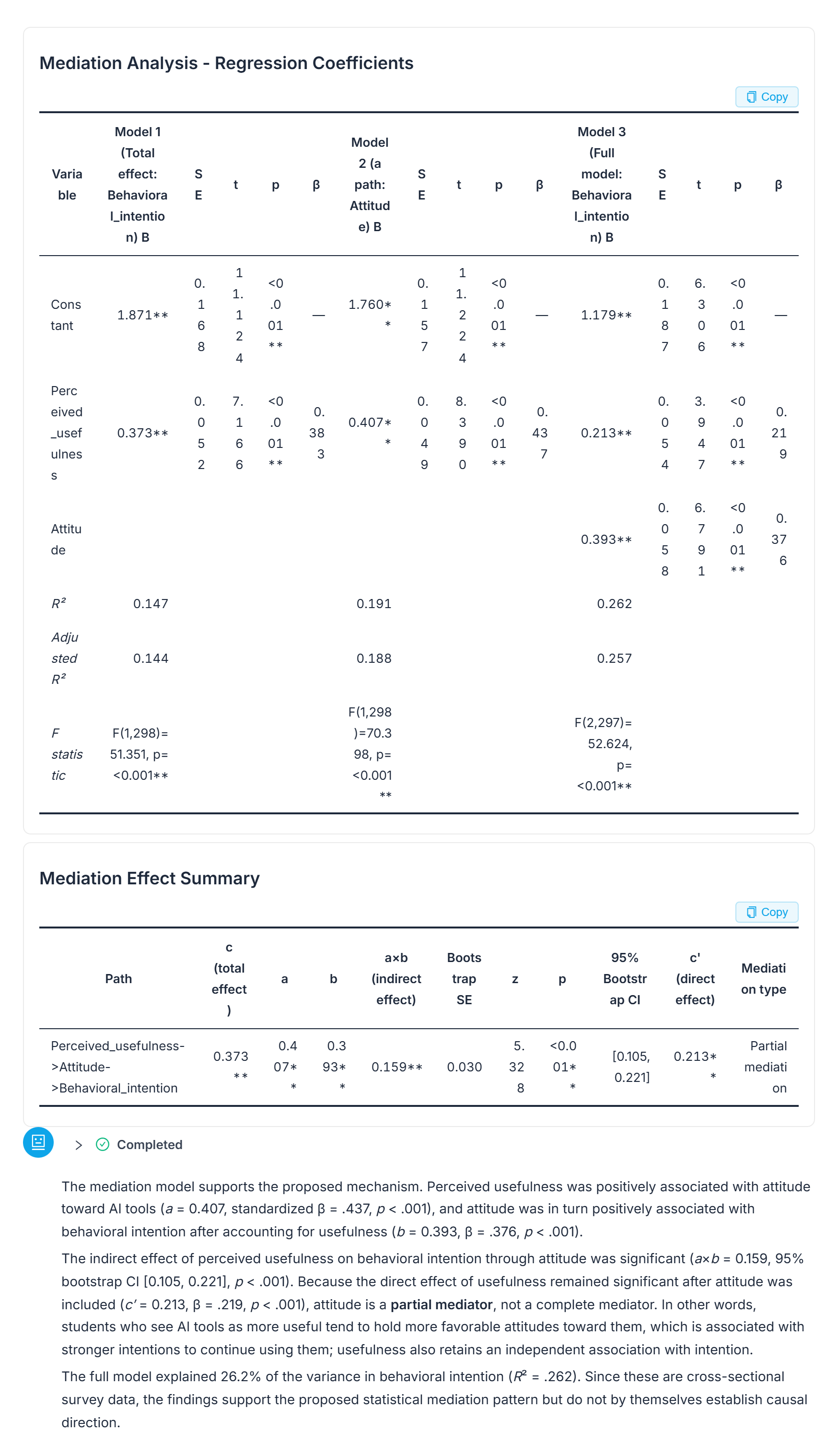 The output panel behind the table above — indirect effect and its 95% bootstrap confidence interval are highlighted directly in the chat.
Partial vs. Full Mediation — Not Covered Here
How to judge whether any of these numbers are actually significant, and how to write them up, is a separate discussion — this walkthrough only covers running the model and reading the raw output. The infographic below maps out the decision path between "partial" and "full" mediation, which this piece doesn't get into.
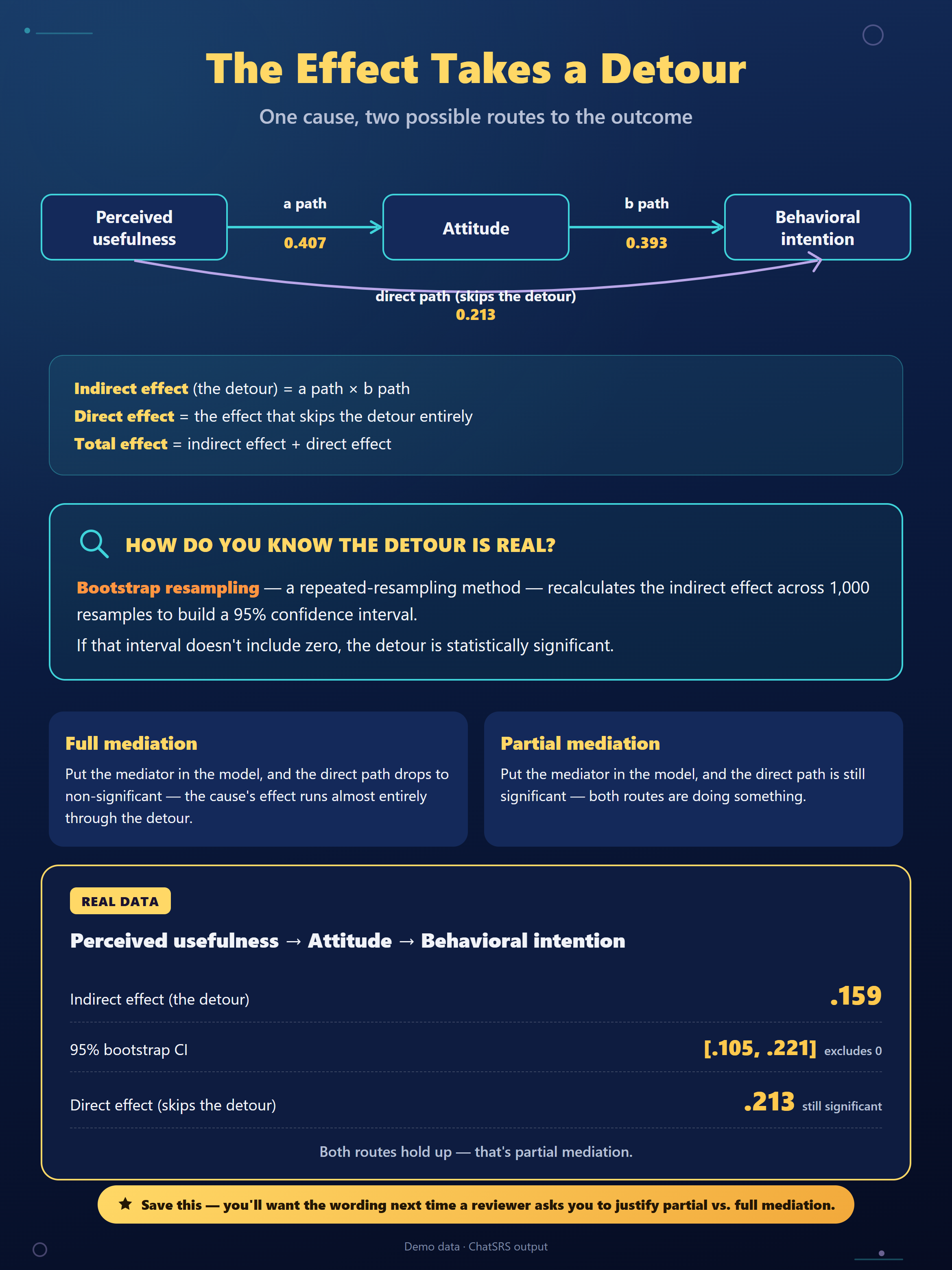 A map of how "partial mediation" versus "full mediation" gets decided — the judgment call itself isn't explained in this walkthrough.
One Boundary Worth Naming
"No plugin required" describes the mechanics of running the test, not a shortcut around the underlying assumptions. The causal ordering between your variables still needs to be justified by your research design, and the path coefficients the AI returns are worth checking against theory.
Every Step Happened Inside ChatSRS
Every step above happened inside ChatSRS's chat interface — no PROCESS add-in installed, no model-number lookup required. The conversational route above replaces the manual regression-and-Sobel-test routine with one prompt and one pass of bootstrap resampling, whether your usual workflow runs through SPSS, Stata, or R.
When This Does Not Apply
- More than one mediator chained in sequence (X → M1 → M2 → Y) is a structural equation modeling question, not this single X → M → Y walkthrough.
- Without a research design that justifies the causal ordering, the bootstrap only tests whether the statistical pattern is consistent with that story — it doesn't prove X causes Y through M.
- With cross-sectional data, as the demo data here is, the output can support a proposed mediation pattern but cannot by itself establish causal direction.
- Comparing group means rather than testing an indirect pathway is an ANOVA question; see how to run ANOVA online with APA output.
Frequently Asked Questions
Do I need PROCESS, Amos, or a separate add-in to run this?
No. The walkthrough above ran the whole model, including bootstrap resampling, inside ChatSRS's chat interface with no PROCESS macro or other add-in installed.
Does this work if I normally use Stata or R instead of SPSS?
Yes. The question a mediation analysis answers doesn't depend on which package you'd otherwise use — the conversational route above works the same regardless of SPSS, Stata, or R.
How many bootstrap resamples does this walkthrough use?
1,000 resamples with percentile confidence intervals, per the run shown above — the same underlying logic PROCESS uses for its own bootstrap confidence intervals.
How do I know if the indirect effect is statistically significant?
Usually by checking whether the bootstrap confidence interval excludes zero. This walkthrough only covers running the model and reading the raw output — judging significance and writing up the result is a separate discussion.
Bottom Line
Mediation analysis doesn't require installing PROCESS by hand or memorizing a model number. Describing the model in one sentence and reading the bootstrap output back is the same underlying test, run a different way.
Run a bootstrap mediation analysis in ChatSRS — bring your predictor, mediator, and outcome variables; no PROCESS macro required.